
Choosing an e-commerce platform gets a lot harder when your catalog is big and most items only exist once. If you sell antiques, collectibles, vintage goods, surplus, or custom pieces, you’re not managing a normal store, you’re managing fast-moving inventory, messy product data, and a higher risk of overselling, which can damage trust fast.
A lot of owners start on a platform that works fine early on, then hit real problems once the catalog grows, search gets clunky, checkout slows down, and inventory stops syncing the way it should. In 2026, customers expect quick search, clean filtering, real-time stock, and smooth selling across your site, marketplaces, and social channels, so the wrong setup costs more than a monthly fee. If you’re also weighing tradeoffs around cost and control, this look at Shopify alternatives saving $500 monthly adds useful context.
This guide compares WooCommerce, Shopify, BigCommerce, and Magento in plain English, including who each one fits, what they cost in real life, and where stores with one-of-a-kind inventory usually run into trouble. It also builds on outside comparisons from XTND and Virtina, so you can move into the first section with a clearer sense of what to avoid.
What makes large, one-of-a-kind inventory so hard to manage online
Large inventory is one thing. Large inventory where almost every item is different is another problem entirely. A normal store can lean on repeat SKUs, stable product pages, and simple stock rules. A one-of-a-kind store can’t. Every sale changes the catalog, and every delay creates risk.
That is why platform choice matters so much here. General platform roundups like XTND’s comparison and Virtina’s guide are helpful, but this kind of inventory has its own pressure points. The hard part is not just storing products. The hard part is keeping the whole system current while people are buying.
For stores with thousands of changing products, “cheap” can get expensive fast if staff time, failed orders, and cleanup work pile up.
You are not just managing a big catalog, you are managing constant change

With one-of-a-kind inventory, your store is always in motion. A product comes in, gets photographed, priced, tagged, described, listed, promoted, sold, then removed. Meanwhile, five more items need updates because the title was weak, the photos were bad, or the pricing changed after you researched the piece a little more.
That constant editing is where weak systems start to feel heavy. If product creation takes too many clicks, your team slows down. If imports are messy, staff starts fixing records by hand. If bulk edits are clumsy, old data hangs around longer than it should. And if sold items don’t come down quickly, the store starts lying to people.
For this kind of business, a platform needs to handle the boring but high-stakes work well:
- Fast product creation for newly arrived items
- Bulk edits for prices, tags, categories, and status
- Clean imports from spreadsheets or intake systems
- Quick unpublishing the moment an item sells
- Search and filters that help buyers find rare items before they disappear
Search matters more here than many owners expect. If a shopper can’t find the exact vintage lamp, signed comic, or used machine part when it’s available, there may never be another shot. You don’t get many second chances with one-off stock. That also means category structure has to stay clean. Bad categories and weak search bury revenue.
A large one-of-a-kind catalog also creates a content problem. Titles need to be specific enough for search, but still readable. Photos need to be attached to the right item every time. Descriptions need enough detail to reduce questions and returns. When the back office can’t keep up, the front of the store looks messy, and messy stores convert worse.
The biggest risk is selling something that is already gone

Overselling is the nightmare scenario for one-of-a-kind inventory. If you sell ten units of the same candle, you can usually backorder or restock. If you sell a one-off antique, rare part, or custom piece that already left the shelf, the sale is broken. There is no backup item waiting in the warehouse.
This usually happens because stock is not updating fast enough across every place you sell. Your website says “in stock,” a marketplace listing is still live, the POS has not synced, and a staff member is packing an in-store sale at the same time. A small lag can create a real mess.
When inventory is unique, sync delays are not small errors. They turn into canceled orders, refunds, and awkward emails.
The damage is bigger than tech frustration. You lose trust, and trust is hard to win back. The customer may not care whether the issue came from a plugin, an app, or a slow database. They only see that you took their money for something you could not deliver.
The cost shows up in several places at once:
- Staff time spent fixing orders and answering upset customers
- Refund fees and payment processing losses
- Missed repeat purchases from people who no longer trust stock accuracy
- Lost revenue when a real buyer gets blocked by bad inventory data
This is why dependable stock control has to cover your whole workflow, not just the product page. Your website, marketplaces, POS, and internal team process all need to agree on what is available right now. If even one part of that chain lags, your inventory count turns into a guess.
Scale problems often show up first at checkout, not in the product grid

A lot of store owners blame hosting first, and sometimes hosting is part of it. But with large, fast-changing inventory, the deeper issue is often platform fit. The site may look okay while browsing categories, then start falling apart where it matters most, at checkout.
That pattern shows up often with WooCommerce on weaker setups. Once a store reaches a few thousand products, then adds traffic, order volume, search tools, filters, shipping rules, and several plugins, the load stacks up. Product pages may still open, but checkout becomes the pressure point. That is where taxes, shipping, payments, stock checks, coupons, customer data, and plugin logic all hit at once.
Each extra plugin can add more database queries and more moving parts. Each custom checkout rule adds another task the server has to process before the order goes through. On a small store, that might be fine. On a busy store with unique inventory, those seconds add up, and then sales start failing.
You can usually spot the warning signs early:
- Checkout takes far too long
- Orders fail or hang after payment
- Inventory updates appear late
- Admin pages feel sluggish during busy times
- Staff starts saying “the site is acting weird again”
If that sounds familiar, the problem is often larger than a hosting upgrade. Better hosting can buy time, and sometimes that is enough for a smaller store. But when the platform depends on too many add-ons to stay functional, you are paying to patch weak fit.
That is one reason many growing sellers move toward hosted platforms or stronger commerce systems once the catalog gets large. If you want a more hands-on take on that tradeoff, this Shopify review for e-commerce gives a practical look at why some store owners prefer a simpler hosted setup over WordPress for selling online.
For a store with one-of-a-kind inventory, checkout speed is not just a performance metric. It is where trust, stock accuracy, and revenue meet. When checkout lags, customers hesitate, sync issues grow, and sold items have more time to slip through the cracks.
The features that matter most when choosing an e-commerce platform in 2026
When you’re picking an e-commerce platform for a large catalog of one-off items, flashy demos don’t help much. The features that matter are the ones your team will touch every day, the ones that keep product data clean, help shoppers find rare items fast, and stop costs from creeping up later.
For 2026, the best platform is usually the one that keeps your back office calm while your storefront stays quick. That balance shows up pretty clearly in side-by-side reviews from XTND’s platform comparison and Virtina’s e-commerce platform guide, but the details matter even more when your inventory is big and every item has its own quirks.
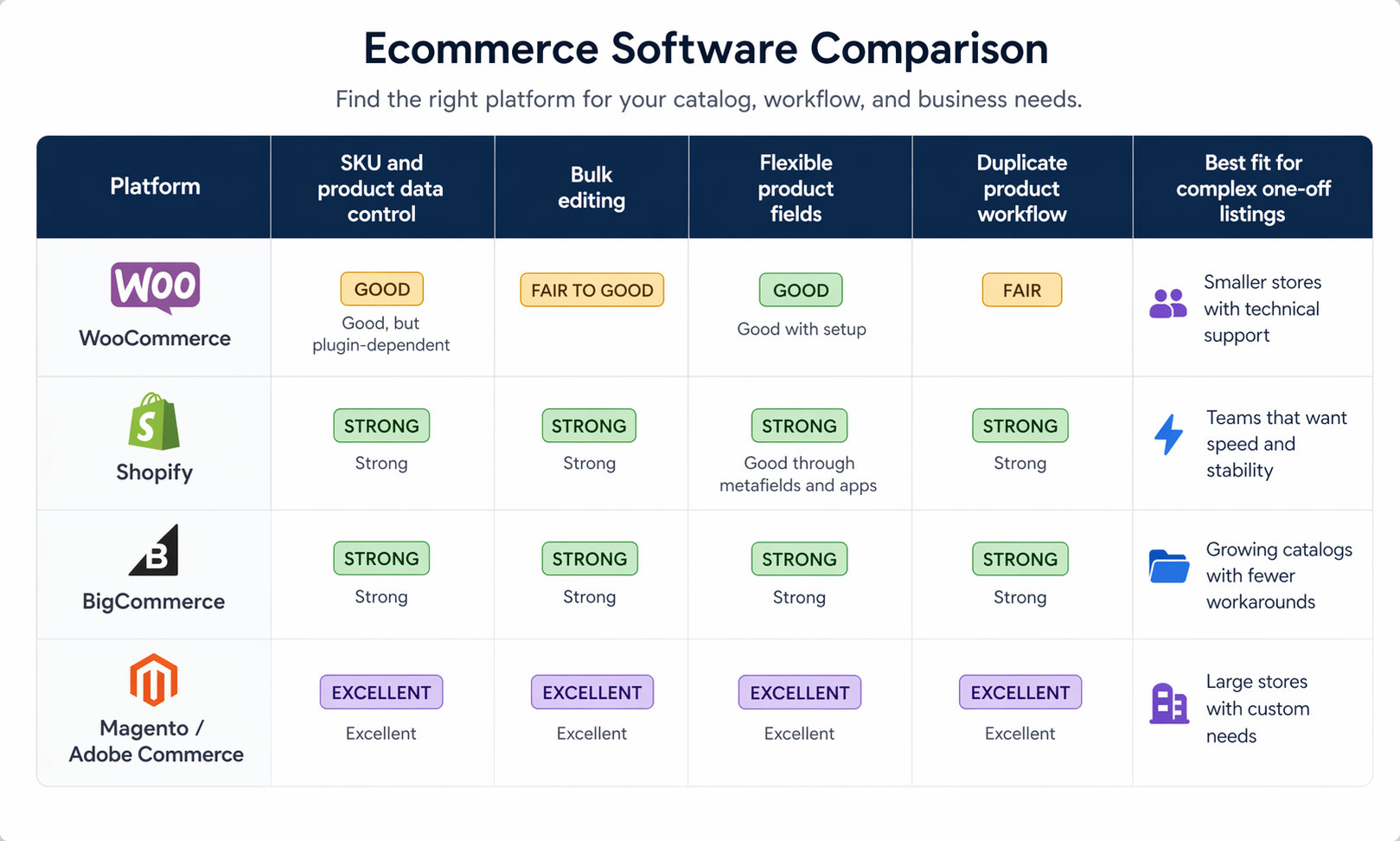
Inventory control, product data, and bulk editing should come first
If your catalog has thousands of one-of-a-kind products, product management is the job. Everything else sits on top of that. A platform can have a pretty storefront, but if adding and updating products feels slow, your whole store drags behind.
You need strong SKU control first, because unique items still need order. That means each product should have a clear internal ID, clean status rules, and dependable stock handling. Variant support matters too, even for stores that mostly sell one-offs, because some items still come in sizes, finishes, bundle sets, or condition grades.

A good platform should also handle messy real-world product data without making you fight it. For one-of-a-kind inventory, that usually means:
- custom fields for condition, era, maker, serial number, material, provenance, or notes
- bulk editing for tags, categories, pricing, and visibility
- imports and exports that don’t break when your spreadsheet gets large
- duplicate product workflows, so staff can clone a similar item instead of starting from zero
- support for many images, detailed attributes, and long descriptions
Flexible product templates matter more than most store owners expect. A vintage chair, a signed comic, and a used machine part do not need the same data fields. If your platform forces every item into one rigid format, your team ends up stuffing details into the wrong places, and that makes search, filtering, and reporting worse later.
This is also where platform differences start to show. WooCommerce can be flexible, but a lot of that flexibility comes from plugins, and that often means more upkeep. Shopify and BigCommerce usually give you faster day-to-day product work. Magento gives you the deepest control, but it usually needs a developer to set up well.
Site speed, search, and filtering directly affect sales
Big catalogs live or die by discovery. Shoppers do not want to scroll through page after page hoping to spot the right item. They want to narrow, sort, and find it quickly, especially on a phone.
That means your platform needs fast category pages, accurate on-site search, and faceted filtering that actually reflects your product data. Filters should work for the details your buyers care about, things like size, condition, color, brand, decade, material, fitment, or availability. If filters are slow or sloppy, the site starts to feel bigger in the worst way.

Mobile browsing matters just as much. A lot of store owners still review their site on a desktop and assume it’s fine. Meanwhile, real buyers are pinching, tapping tiny filters, and waiting for heavy pages to load. If they cannot narrow down thousands of unique items in a few seconds, they leave. They don’t send feedback. They just leave.
For large one-of-a-kind catalogs, search and filters are part of the sales process, not just navigation.
This is one area where scale exposes weak setups fast. WooCommerce can work, but once search plugins, layered filters, and a large database pile up, the experience often gets heavier. Hosted platforms usually stay more predictable here. Magento is also strong, especially for stores with complex category structures and large attribute sets.
AI search and personalized discovery are getting more attention in 2026, and they can help surface similar items or guide browsing. Still, they should stay in the “nice to have” bucket until the basics are solid. Fast pages, clean filters, and accurate search do more for revenue than fancy recommendations on a shaky foundation.
Apps, integrations, and total cost matter more than sticker price
The monthly plan on the pricing page is only part of the bill. Once a store grows, the real cost includes hosting, paid apps, maintenance, developer help, performance tools, and all the time your team spends fixing problems.
That is why cheap up front can get expensive later. WooCommerce is the clearest example. It often looks affordable at the start, but large stores usually add better hosting, premium plugins, speed tools, and regular dev support. At that point, you’re paying for patches, not just features. For stores already feeling strain, that kind of buildup is a sign to look harder at long-term fit, or even review outside help through ecommerce website development options.
Shopify and BigCommerce usually cost more on paper early on, but the price is easier to predict. You are paying for less server stress and fewer moving parts. Magento often gives the most control and scale, yet it also tends to carry the highest total cost because setup, customization, and ongoing support are heavier.
This is the cost picture to keep in mind before you reach the pricing section later in the article:
| Platform | Upfront cost feel | App and integration load | Ongoing technical upkeep | Cost predictability as you grow | Common reality at scale |
|---|---|---|---|---|---|
| WooCommerce | Low | Often high | High | Low | Cheap start, rising maintenance |
| Shopify | Medium to high | Medium | Low | High | Stable, but apps can add up |
| BigCommerce | Medium | Lower than many expect | Low to medium | High | Balanced cost for growing stores |
| Magento / Adobe Commerce | High | Medium | Very high | Medium | Powerful, but expensive to run |
A platform should also connect cleanly with the tools you already use, or plan to use soon. That includes POS, ERP, shipping software, accounting, email, marketplaces, and inventory feeds. Every weak integration creates handwork, and handwork gets expensive when your catalog is large.
Time counts too. If your team spends hours fixing imports, editing around app limits, or chasing stock issues, that is part of platform cost. It may not show up as one line item, but it still comes out of the business.
How the top platforms compare for large, one-of-a-kind inventory
Once a catalog gets big and every item has its own quirks, platform differences stop feeling theoretical. They show up in checkout speed, stock accuracy, staff workload, and how often you have to stop what you’re doing to fix something. For small business owners, that matters a lot, because time spent cleaning up platform problems is time you can’t spend buying, listing, shipping, or selling.
The short version is pretty practical. Some platforms are easier to live with, some give you more control, and some handle complexity better once your store gets heavy. The hard part is matching the platform to the kind of stress your inventory creates.
A quick product comparison helps frame the tradeoffs.
| Platform | Best fit | Large catalog handling | Checkout stability | Customization | Technical workload |
|---|---|---|---|---|---|
| WooCommerce | Small to midsize stores that want WordPress control | Fair to good, depends on setup | Fair on lighter stores, weaker as complexity grows | Very high | High |
| Shopify / Shopify Plus | Growing brands that want stable operations | Very good | Very good | Moderate | Low |
| BigCommerce | Growth-stage stores that want balance | Very good | Very good | Good | Low to medium |
| Magento / Adobe Commerce | Large stores with custom needs | Excellent | Excellent | Excellent | Very high |
| Salesforce Commerce Cloud | Enterprise, multi-brand, global operations | Excellent | Excellent | High within enterprise setup | High, with enterprise support |
The pricing picture also shifts once you factor in apps, hosting, maintenance, and developer time.
| Platform | Entry-level cost feel | Typical cost at scale | Cost pattern |
|---|---|---|---|
| WooCommerce | Low upfront | Often climbs fast with hosting, plugins, and dev work | Cheap to start, less predictable later |
| Shopify / Shopify Plus | Medium to high | Predictable, but higher at the top end | Stable monthly spend, apps can add up |
| BigCommerce | Medium | Often balanced, especially with fewer paid add-ons | Strong value as stores grow |
| Magento / Adobe Commerce | High | One of the highest total costs | Powerful, but expensive to build and run |
| Salesforce Commerce Cloud | Very high | Enterprise-level pricing | Built for large brands, not small teams |
WooCommerce gives flexibility, but large unique catalogs can push it too far
WooCommerce works well when you want WordPress freedom and you don’t mind getting your hands dirty. For a small or midsize store, that can be a great fit. You get control over content, design, and features, and you can shape the store around how you work.
The trouble starts when growth piles on top of that flexibility. More products usually mean more filters, more search demands, more plugins, and more strain on the database. Then traffic grows, orders hit at the same time, and the whole setup starts to feel like an old shelf holding too much weight.

If you’re seeing failed orders, long checkout times, stock mismatches, or timeout errors, that usually points to more than cheap hosting. In many cases, the store has hit deeper limits in how the system is put together. WooCommerce can still scale, but now you’re paying for the heavier version of it:
- Better hosting or a dedicated server
- Database cleanup and tuning
- Fewer, better plugins
- Custom development to patch weak spots
- Ongoing maintenance from someone who knows the stack
That can work, and some stores do it well. Still, the cost climbs quickly, and so does the need for technical help. For large one-of-a-kind inventory, WooCommerce often feels best when the business still values WordPress flexibility more than pure operational stability.
Shopify and Shopify Plus are often the easiest path to stable growth
Shopify is popular for a simple reason, it removes a lot of the day-to-day stress. Hosting is handled for you, checkout is dependable, and you don’t have to babysit servers or patch the store every time traffic spikes. For many owners, that predictability is worth a lot.
As catalogs grow, Shopify usually stays calm where weaker setups start to wobble. Product management is straightforward, the admin is easy to use, and checkout tends to stay reliable even when the store gets busy. If your current store feels fragile, Shopify Plus is often the fastest way to get back to stable ground without rebuilding your life around infrastructure.
That ease comes with tradeoffs. You’ll often rely on apps for advanced needs, and app costs can pile up. You also have to live inside Shopify’s rules, which can feel limiting if your workflow is unusual or highly custom. At the high end, monthly platform costs are much higher than a basic WooCommerce setup on paper.
Even so, Shopify is often the safest choice for owners who want fewer technical fires. If your goal is to keep the store selling, keep checkout solid, and stop worrying about what the server is doing at 2 a.m., Shopify earns its reputation.
BigCommerce is a strong middle ground that more stores should consider
BigCommerce doesn’t always get the same attention, but it deserves a closer look. For a lot of growing stores, it hits a sweet spot between ease, features, and long-term sanity. You get a hosted platform like Shopify, but you often need fewer apps to make the store work the way you want.
That matters more than it sounds. Fewer add-ons usually means lower monthly overhead, less complexity, and fewer moving parts to break. For stores with large catalogs, BigCommerce tends to hold up well while keeping the backend manageable for a small team.

In practical terms, BigCommerce fits businesses that want:
- More built-in selling features
- Good performance with large product counts
- Less platform overhead than Magento
- More balance between control and simplicity
- Costs that stay reasonable as the store grows
For growth-stage brands, that’s a strong offer. BigCommerce often feels like the sensible pick for owners who have outgrown the patchwork feel of WooCommerce but don’t want the app stack or pricing path that can come with Shopify Plus.
Magento is built for complexity, and Salesforce Commerce Cloud is enterprise only
Magento, now Adobe Commerce at the enterprise level, is still one of the strongest choices when a store has serious complexity. It handles large catalogs, custom pricing rules, multi-store setups, and deep backend logic better than most platforms. If your inventory structure is messy, your pricing is layered, and your operation has outgrown simple tools, Magento can handle it.
The catch is cost, and not just license cost. Magento usually needs a real development team, more planning, more setup, and more ongoing work. That makes it powerful, but it also gives it one of the highest total costs of ownership in this group. For the right business, that’s fine. For many small business owners, it’s more platform than they need.
Salesforce Commerce Cloud sits even further up the ladder. It’s a hosted enterprise system built for large brands, global operations, multiple sales channels, and complex internal workflows. It’s strong, but it’s also expensive and usually out of range for smaller teams managing a single brand or modest operation.
If you want extra context before making a call, these outside breakdowns are worth scanning: this platform comparison from XTND and this broader e-commerce platform guide from Virtina. Both help show why Magento is often the long-term power option, while Salesforce Commerce Cloud is mostly a fit for enterprise-level needs.
A simple pricing reality check for 2026
Pricing pages can be a little misleading, and small business owners feel that fast. The monthly plan you see first is rarely the full cost once your catalog gets big, your order flow gets messy, and your store needs to stay accurate every day. For large, one-of-a-kind inventory, the real question is not “Which platform is cheapest?” It’s “Which one stays affordable while still working well?”
That difference matters because cheap software can turn into expensive cleanup. A lower monthly fee does not help much if checkout slows down, orders fail, or your team spends hours fixing product data by hand. The broad pattern also lines up with comparisons from XTND’s platform breakdown and Virtina’s e-commerce platform guide, especially once you look past entry pricing.
The cheapest plan is usually not the cheapest store
Most owners start by comparing platform fees, which makes sense. Still, that number is only one piece of the bill. Once a store grows, you also pay for apps, developer help, hosting, speed fixes, and the time your team loses when the system gets fussy.
WooCommerce is the classic example. It looks low-cost at first because the core plugin is free. But large stores usually need better hosting, paid extensions, performance work, and regular maintenance. In other words, the platform may be cheap, but the operation often isn’t.
Shopify and BigCommerce usually feel more expensive up front. However, they often stay more predictable because hosting and core stability are already built in. Magento is the heavy-duty option, and it can do a lot, but most small teams feel the weight of its cost pretty quickly.

Pricing comparison chart for 2026
A side-by-side view makes the tradeoffs easier to see.
| Platform | Entry pricing | Typical cost as store grows | Enterprise or large-scale range | Cost pattern |
|---|---|---|---|---|
| WooCommerce | Free plugin, plus hosting | Often $500 to $2,000+ per month with hosting, plugins, and maintenance | Can reach $2,000+ per month on heavier setups | Low start, less predictable later |
| Shopify | About $29 to $39 per month | Often $150 to $800 per month with apps | Shopify Plus starts around $2,300+ per month | Higher base cost, more stable month to month |
| BigCommerce | About $29 per month | Often $100 to $500 per month | Roughly $1,000 to $10,000 per month on enterprise plans | Good balance, fewer paid add-ons for many stores |
| Magento / Adobe Commerce | Open source starts low on paper | Often $2,000 to $8,000 per month once hosting and dev work are included | $10,000+ per month is common for larger builds | Highest total cost, strongest customization |
The takeaway is pretty plain. WooCommerce is cheapest when the store is small. After that, the math changes. Shopify and BigCommerce often cost less to live with, while Magento costs the most but handles the most complexity.
If your store is already losing time or orders, the lowest monthly fee may be the most expensive option you can choose.
Product comparison chart for real-world buying decisions
Price matters, but owners usually care about a second question too: what are you getting for that spend? A simple product comparison helps show why some platforms feel cheap at first and costly later.
| Platform | Best fit | Stability at scale | Large inventory handling | Technical workload | Best pricing takeaway |
|---|---|---|---|---|---|
| WooCommerce | Small to mid-size stores that want WordPress control | Fair to weak once complexity rises | Weak to fair without serious tuning | High | Cheap early, costly when problems stack up |
| Shopify | Growing stores that want easy operations | Strong | Very good | Low | Predictable and often worth it for reliability |
| BigCommerce | Growth-stage brands that want balance | Strong | Very good | Low to medium | Often the best ROI at scale |
| Magento / Adobe Commerce | Large, complex stores with a dev team | Excellent | Excellent | Very high | Powerful, but expensive from day one |
This is where pricing gets more honest. You are not only buying software. You are buying stability, speed, and fewer fires to put out.
Where each platform usually lands on cost versus value
For a lot of stores, the real decision comes down to tradeoffs, not features on a sales page. One platform saves cash at the start. Another saves time later. Another saves your store when catalog size and order volume get serious.
A simple way to look at it is this:
- WooCommerce works best when flexibility matters most and the store is still manageable.
- Shopify is often the fastest fix when you need stable checkout and fewer tech headaches.
- BigCommerce is a strong middle-ground when you want scale without Magento-level overhead.
- Magento makes sense when your catalog, pricing rules, or backend needs are too complex for simpler platforms.
That is why so many large inventory stores end up on Shopify Plus or Magento over time. They may not start there, because the upfront cost feels heavy, but they often land there after paying for patches, workarounds, and repeated cleanup somewhere else.
The real pricing question small business owners should ask
By 2026, a better pricing question is: “What will this platform cost me once the store is busy, not just while it’s quiet?” That one question clears up a lot of confusion.
If your current setup has slow checkout, stock errors, or failed orders, then you are already paying hidden platform costs. They just show up as lost sales, refund work, and stress instead of a neat monthly invoice. In that situation, Shopify or BigCommerce often gives the clearest short-term relief, while Magento is the long-term power option if you have the budget and technical support to back it up.
For large, one-of-a-kind inventory, price without reliability is a false bargain. The better buy is usually the platform that keeps sales moving and your team out of repair mode.
How to choose the best platform for your store, without making an expensive mistake
Picking a platform is a lot like signing a lease. It feels simple on day one, then the real cost shows up once you’re settled in. A cheap start can turn into slow checkout, patchwork apps, and late-night fixes if the store outgrows the setup too fast.
That is why the best choice usually has less to do with today’s product count and more to do with where the business is heading next. If you want a broader outside view, both XTND’s platform comparison and Virtina’s ecommerce platform guide line up with the same basic truth: platform mistakes get expensive once inventory, traffic, and order volume climb.
Choose based on your next stage of growth, not just where you are today
If your store has 1,500 products now, but you’re on pace to hit 8,000 next year, that matters. If you sell only on your website today, but plan to add eBay, Etsy, POS, or social selling soon, that matters too. The right platform needs room for the next 12 to 24 months, not just this quarter.

A few planning points usually make the decision much clearer:
- Catalog size
More products mean more search load, more filters, more admin work, and more chances for product data to get messy. - Traffic and order spikes
A store might feel fine on a quiet Tuesday, then wobble on a holiday sale or after a good email campaign. - Team size
A solo owner can tolerate more manual work than a team listing hundreds of items a week. Once more people touch the store, clunky workflows cost real money. - Sales channels
Selling in more places can grow revenue fast. It also raises the risk of sync issues, duplicate work, and overselling. - Inventory complexity
One-of-a-kind items, condition notes, serial numbers, and custom fields put more pressure on the platform than a simple catalog with repeat SKUs. - Speed versus customization
Some businesses need to launch and scale with fewer moving parts. Others need custom pricing, special workflows, or unusual catalog logic.
This is where many owners trip up. They choose the cheapest launch option because it feels safe. But the cheapest launch is often the most expensive long-term path if you outgrow it in a year. WooCommerce, for example, can work well while the store is lean. Still, once plugins pile up and the database gets heavy, you’re often paying for maintenance instead of progress.
A simple way to check yourself is to ask, “Will this platform still feel calm when my catalog doubles?” If the answer is shaky, keep looking. Even strong hosting only buys time if the store is already straining. For WordPress-based stores, reliable infrastructure helps, and budget-friendly hosting for online stores can support a smaller setup, but hosting alone does not fix a platform that no longer fits the business.
This quick pricing view helps show why the lowest monthly fee can mislead you.
| Platform | Upfront cost feel | Typical cost as store grows | What usually drives the increase |
|---|---|---|---|
| WooCommerce | Low | Medium to high | Hosting, plugins, maintenance, developer fixes |
| Shopify | Medium | Medium to high | App costs, premium plans, transaction costs |
| BigCommerce | Medium | Medium | Plan upgrades, enterprise features, fewer add-ons than many competitors |
| Magento / Adobe Commerce | High | High to very high | Development, hosting, setup, ongoing support |
The pattern is pretty plain. WooCommerce often wins on startup cost, while Shopify and BigCommerce usually win on predictability, and Magento wins on depth if you can afford it.
Best fit by business type: quick recommendations readers can act on
You do not need a perfect platform. You need one that matches the kind of stress your store will create. That usually comes down to how much complexity you can handle, how stable checkout needs to be, and whether your team can live with technical upkeep.

A fast recommendation guide helps cut through the noise:
| Platform | Best fit | Strengths | Main tradeoff |
|---|---|---|---|
| WooCommerce | Small stores that want flexibility and can stay lean | Full control, WordPress content tools, low barrier to start | Gets fragile as plugins, traffic, and catalog size grow |
| Shopify / Shopify Plus | Stores that need stable checkout and easier scaling | Hosted, dependable, easier day-to-day management | Higher monthly cost, app dependence for advanced needs |
| BigCommerce | Businesses that want a balanced, scalable option | Strong built-in features, good catalog handling, solid value at scale | Smaller ecosystem than Shopify |
| Magento / Adobe Commerce | Complex operations with budget and developer support | Deep customization, large catalog strength, strong multi-store support | Highest cost and technical workload |
In plain English, here is how that usually plays out.
If you’re still a smaller store, your catalog is manageable, and you care a lot about WordPress flexibility, WooCommerce can still make sense. It just works best when you keep the setup lean and accept that scale will take work.
If checkout reliability is the main pain point, Shopify or Shopify Plus is often the safest move. For many owners, it is the fastest route to a store that simply works each day without constant babysitting. That tradeoff matters even more if your team is tired of fixing site issues instead of listing products.
If you want something in the middle, BigCommerce deserves more attention than it gets. It tends to offer a strong balance of built-in features, scale, and lower app dependence. For growth-stage stores, that can be a very sensible place to land.
If your operation has complex pricing, multi-store needs, custom workflows, or a huge catalog with lots of logic behind it, Magento is still one of the strongest options. But it needs budget, planning, and developer support. Otherwise, it becomes a heavy machine sitting in a small garage.
When a store already has failed orders, slow checkout, or bad inventory sync, staying put can cost more than migrating.
That part gets missed all the time. Owners compare platform fees and forget to price in lost sales, refunds, staff time, and customer trust. If your store takes three minutes to check out, or inventory goes out of sync, the monthly savings are not really savings anymore. They are just hidden costs.
So, if you’re choosing with a clear head, keep the decision tied to your real business type:
- Pick WooCommerce if flexibility matters most and growth is still controlled.
- Pick Shopify if you need stability, speed, and less technical strain.
- Pick BigCommerce if you want scale without as much overhead.
- Pick Magento if complexity is high and you have the budget to support it.
That is usually the line between a platform that helps you grow and one that quietly slows you down.
Conclusion
For large, one-of-a-kind inventory, the platform you choose has a direct effect on accuracy, checkout reliability, customer trust, and long-term profit. When a store grows past a few thousand products, especially with heavy plugin use, WooCommerce often gets harder and more expensive to keep stable. Meanwhile, Shopify and BigCommerce usually give small teams a steadier day-to-day setup, and Magento makes the most sense when the catalog and workflow are complex enough to justify the cost.
The main takeaway is pretty simple. Pick the platform that fits your catalog complexity, your team’s capacity, and your growth plans. Don’t choose based only on the lowest monthly fee, because cheap upfront can turn into failed orders, stock mistakes, and cleanup work later.
If you want one more side-by-side look, both XTND’s platform comparison and Virtina’s ecommerce platform guide are helpful references. The right system is the one that keeps your store calm as it gets bigger.


0 Comments