The Hidden Risks of Website Tracking: A Business Owner’s Guide to Data Privacy and Consent

by | May 7, 2026 | Business | 0 comments

Last summer, I was working on what I thought was going to be a fairly straightforward analytics project. I added the Facebook Pixel to our Google Tag Manager setup, which meant we had to rebuild and rethink a lot of our website tracking.

At the time, we were using several tracking tools — Google Analytics, Google Tag Manager, Facebook, advertising pixels, conversion tracking, and other marketing scripts. What started as a technical update quickly turned into a much bigger question: what can a website collect before a user gives consent?

That question became even more urgent after the company faced a legal complaint related to website tracking. Suddenly, this was not just about marketing data or cleaner analytics. It was about legal risk, customer privacy, third-party sharing, and whether “basic analytics” is really as harmless as it sounds.

A strong consent solution sounds simple at first: do not track anything unless the user says yes. From a privacy and legal-risk standpoint, that is the cleanest approach. But from a business standpoint, it creates another problem. If a business loses visibility into website activity, it becomes harder to know what is working, what is not working, where customers are dropping off, and whether advertising dollars are being spent wisely.

That is where I started seeing the gray area.

Some people believe the safest answer is simple: collect no data unless the user gives consent. Others argue that businesses should still be able to collect basic, non-personal analytics, such as page views, clicks, and purchase totals, as long as names, emails, and other personal information are not being collected.

But once that data is sent to platforms like Google, Meta, or Microsoft, the issue becomes harder to explain. Business owners may not fully know what is being collected. Website visitors may not know what is being shared. And both sides are left trying to understand a system that is technical, legal, and often unclear.

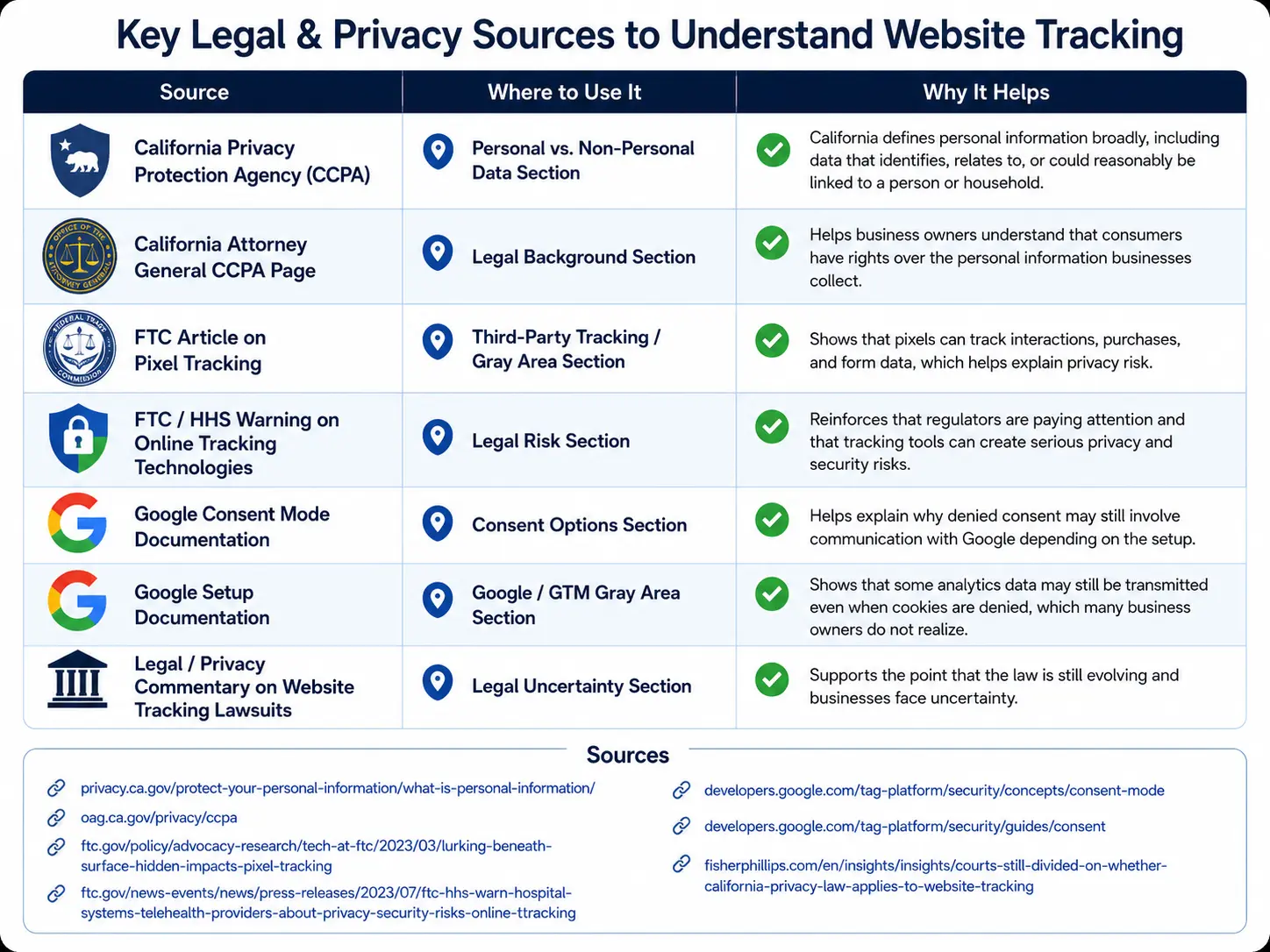
There is also a bigger conflict-of-interest question that business owners should at least be willing to ask. Google helps set many of the standards website owners are told to follow, especially through tools like Google Tag Manager, Google Analytics, and Consent Mode. But Google is also one of the companies receiving and processing the data. That does not automatically mean the tools are bad or that the standards are wrong, but it does mean business owners should not blindly rely on the same company that benefits from data collection to fully define what responsible data collection looks like.  Google’s own Consent Mode documentation says consent mode can send consent-state pings, key event pings, and Google Analytics pings depending on how it is implemented. That does not automatically mean the setup is unlawful, but it does show why business owners should understand that “denied” consent settings do not always mean no communication at all with Google.

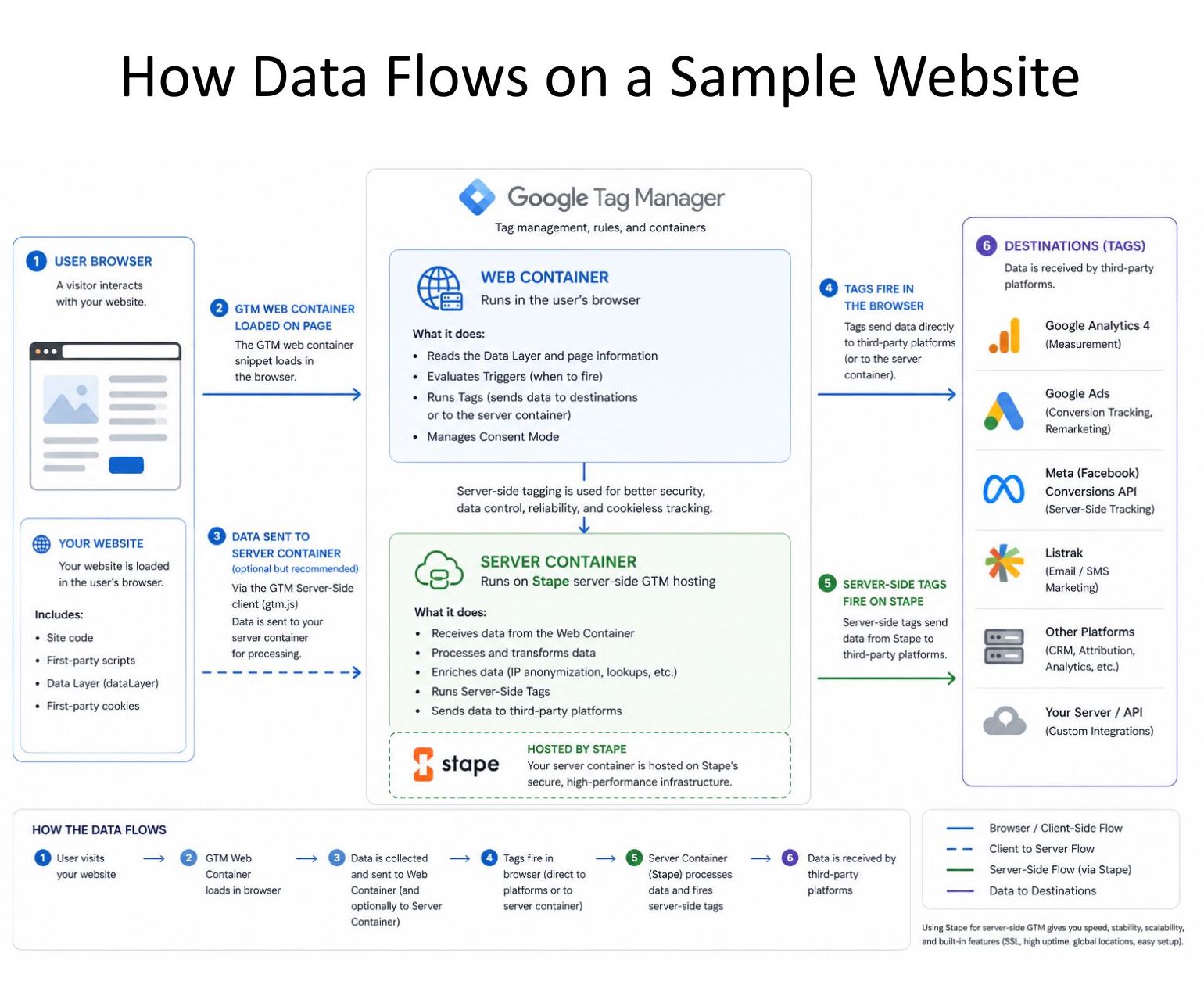
This article is about that gray area. It looks at what website tracking tools may collect, what third-party sharing means, why business owners care about analytics, why developers worry about consent, and what questions every business owner should ask before deciding what their website should track before a user says yes.

Why Website Tracking Is So Confusing

Website tracking sounds simple until you actually start looking at what is happening behind the scenes. Most business owners think of analytics as basic information: how many people visited the website, which pages they looked at, what buttons they clicked, and whether they purchased something. On the surface, that does not sound very personal. It feels more like business reporting than customer surveillance.

The confusion starts when that information is not just staying on the website. When a website uses tools like Google Analytics, Google Tag Manager, Facebook Pixel, Microsoft Ads, or other marketing platforms, some of that data is being sent to outside companies. That means the business owner is no longer just asking, “What information do I want to see in my reports?” They also have to ask, “What information am I sharing with a third party, and what are they doing with it?”

That is where the issue gets messy. A page view may seem harmless. A button click may seem harmless. A purchase total may seem harmless. But when that information is combined with cookies, device information, IP addresses, ad click IDs, browser details, or user behavior over time, it may become more identifying than the business owner realizes. This is what makes “non-personal data” hard to define.

For example, if a website sends Google Analytics a report that says someone viewed a product page, that may seem like basic analytics. But if that visit is also connected to a browser, device, location, cookie ID, previous visit, ad click, or checkout behavior, it may not feel so basic anymore.

This creates uncertainty for everyone involved. Business owners are often told that certain types of tracking are normal, standard, or allowed, but they may not fully understand what is being collected, what is being shared, or how those pieces of data can be combined later. Website visitors may see a cookie banner or inspect the website and notice that data is going to Google, Meta, Microsoft, or another platform, but they usually cannot see the full picture of what was collected, how it was processed, or whether it was connected to other data.

The business owner wants useful information without creating legal risk. The customer wants privacy without having to become a data privacy expert. The developer wants a setup that is technically clean and defensible. The marketing team wants enough data to make smart decisions.

That is why this topic cannot be reduced to a simple answer like “tracking is fine” or “tracking is bad.” The real issue is whether the business understands what it is collecting, whether the customer has a meaningful choice, and whether the data being shared is truly as non-personal as everyone assumes.

What Counts as Personal vs. Non-Personal Data?

One of the hardest parts of website tracking is figuring out what actually counts as personal data. Most people understand that a name, email address, phone number, home address, or credit card number is personal. If a website collects that information and sends it to another company, it is easy to see why privacy laws would care about it.

The confusion starts with the data that does not look personal at first. A page view does not seem personal. A button click does not seem personal. A purchase total does not seem personal. If a business owner sees a report that says 500 people visited a product page or 25 people clicked “Add to Cart,” that feels like general business information.

But website data does not always stay that simple. A single page view may not identify someone by itself, but it can become more meaningful when it is connected with other details, such as an IP address, cookie ID, device information, browser type, location, ad click ID, or previous visits. That is where “non-personal” data can start moving into a gray area.

For example, a business owner may think they are only sending Google Analytics a basic event like “purchase completed” or “product viewed.” But depending on how the website is set up, that event could also include other details, such as the product name, order value, page URL, customer behavior, or identifiers that help connect that visit to a returning user. The business may not be intentionally sending personal information, but the full tracking setup may still reveal more than the owner realizes.

This is why I think business owners need to be careful with the phrase “basic analytics.” Basic analytics sounds harmless, but it depends on what is included, where the data is sent, and whether it can be connected back to a person or household. The risk is not always in one piece of data by itself. The risk is often in how multiple pieces of data are collected, combined, stored, and shared.

Legally, one reason this issue gets complicated is that “personal information” can be broader than many business owners realize. Under California privacy guidance, personal information can include data that identifies, relates to, or could reasonably be linked to a person or household, either directly or indirectly. The California Attorney General also lists examples such as records of products purchased, internet browsing history, geolocation data, and inferences that could create a profile about someone’s preferences or characteristics. That means business owners should be careful about assuming that website behavior, cookies, device identifiers, IP addresses, or transaction activity are automatically non-personal just because they do not include a name or email address.

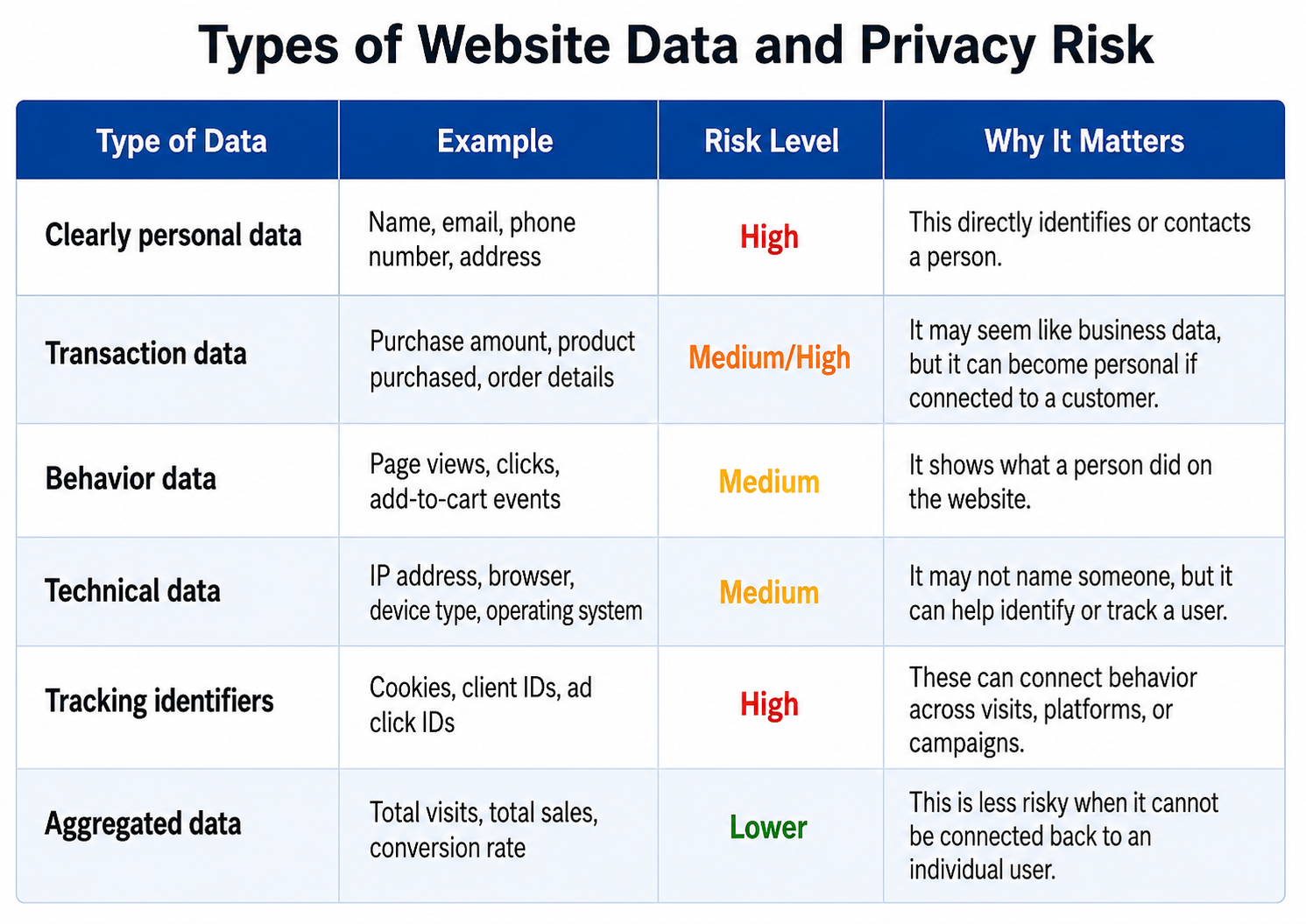
A safer way to think about website data is to put it into categories:

types of website data and privacy risks

The key difference is whether the data can be connected back to a person. If the data is truly aggregated, such as “the website had 10,000 visits this month,” the privacy risk is lower. But if the data follows a user across pages, sessions, devices, ads, or purchases, then it becomes more complicated.

This is the part business owners need to understand before they rely on analytics tools. The question is not only, “Are we collecting names and emails?” The better question is, “Are we collecting or sharing anything that could identify, track, profile, or follow a person over time?”

That question changes the conversation. It moves the issue away from simple labels like “personal” or “non-personal” and forces the business to look at how the data actually works.

Why Business Owners Care About Analytics

It is easy to criticize website tracking until you are the person responsible for making business decisions without enough information. For a business owner, analytics are not just numbers on a screen. They are part of how the business understands what is working, what is broken, and where money may be getting wasted.

If a website gets traffic but no sales, the business owner needs to know where people are dropping off. Are visitors leaving on the homepage? Are they viewing product pages but not adding anything to the cart? Are they adding items to the cart but abandoning checkout? Are ads bringing in the wrong audience? Is a technical issue preventing people from completing a purchase? Without analytics, these questions become much harder to answer.

This is why losing tracking can feel alarming. When a consent banner blocks analytics until someone clicks “accept,” the business may still be getting visitors, but it may not be able to see all of them in the reports. To the business owner, the numbers may look like traffic dropped overnight. In reality, the traffic may still be there, but the visibility is gone.

That distinction matters. A drop in reported traffic does not always mean fewer people are visiting the website. Sometimes it means fewer people are being tracked. But from the business side, both situations create uncertainty. If the owner cannot see the full picture, it becomes harder to make confident decisions about advertising, website changes, product pages, email campaigns, and sales performance.

This is especially important for businesses that spend money on digital advertising. If a business pays for Google Ads, Facebook Ads, Microsoft Ads, or another platform, it wants to know whether those ads are leading to real results. Analytics help connect marketing spend to business outcomes. Without that connection, the business may keep spending money on campaigns that are not working, or it may cut campaigns that actually were working but are no longer being measured accurately.

Analytics also help protect the customer experience. If checkout breaks, a form stops working, or a product page has a problem, tracking can help the business notice the issue faster. A business owner who cannot see where customers are getting stuck may lose sales without understanding why.

So when business owners push for more analytics, it is not always because they do not care about privacy. Often, they are trying to protect the health of the business. They want to make good decisions, keep advertising accountable, understand customer behavior, and avoid flying blind.

The challenge is that useful data and privacy risk can exist at the same time. A business can have a legitimate need for analytics, while customers can also have a legitimate right to privacy and control over their data. The real question is not whether analytics matter. They do. The better question is how much data a business truly needs, when that data should be collected, and whether it can be collected in a way that is transparent, limited, and respectful of the user’s choice.

Why Developers Worry About Consent

Developers tend to look at website tracking differently than business owners and marketing teams. A business owner may be thinking about sales, reports, and legal exposure. A marketing team may be thinking about attribution, campaign performance, and whether the ads are bringing in the right customers. But a developer is usually thinking about what is actually happening in the code.

That matters because consent is not just a message on a banner. It is a technical setup.

A website can say, “We respect your privacy,” but if Google Tag Manager, Google Analytics, Facebook Pixel, Microsoft Ads, or other third-party scripts have already loaded before the user makes a choice, then the banner may not mean very much. From a developer’s perspective, the important question is not just what the banner says. The question is what the website actually does before and after the user clicks accept or reject.

That is why the cleanest technical approach is often the strictest one: do not load tracking scripts until the user gives consent. If the script never loads, then the tag cannot fire. If the tag cannot fire, then the data cannot be sent. This kind of setup is easier to understand, easier to explain, and easier to defend because there is a clear line between no consent and consent.

The problem is that real websites are not always simple. Many businesses have dozens of tags, triggers, pixels, scripts, plugins, and third-party tools connected to the site. Some are used for analytics. Some are used for advertising. Some are used for email marketing, reviews, checkout, fraud prevention, accessibility, personalization, or customer support. A developer has to figure out which tools are necessary, which ones are optional, which ones collect data, and which ones should be blocked before consent.

This gets even harder when the business wants a middle-ground setup. For example, the business may want to allow “basic analytics” before consent, but block marketing and personal-data tracking until consent is granted. That sounds reasonable, but it requires someone to define exactly what basic analytics means, which tags qualify, what data those tags collect, and whether any identifiers, purchase data, or behavioral data are being sent along with them.

That is where developers get cautious. They know that a small configuration mistake can change the whole risk level. A tag may look like it is only tracking page views, but it may also collect cookies, URLs, product details, transaction values, device information, or other identifiers. A trigger may fire too early. A plugin may load a script outside of Google Tag Manager. A checkout page may send more information than expected. A consent banner may show correctly on the screen while tracking has already happened in the background.

Developers also understand that once data leaves the website, the business has less control over it. The developer can control whether a script loads, what event is pushed into the data layer, what tags are configured, and what triggers fire. But once the information is sent to a third-party platform, the business is relying on that platform’s documentation, settings, and policies.

This is why a cautious developer may sound overly strict when they say, “No consent should mean no tracking.” They are not trying to make marketing harder. They are trying to build something that is technically clear, legally safer, and easier to prove if anyone asks what the website was doing.

In my opinion, this is the part business owners need to respect. A developer’s caution is not a lack of business sense. It is a different kind of risk management. They are looking at what can be proven in the code, not just what seems reasonable in a meeting.

A good consent setup needs both perspectives. It needs the business owner’s understanding of what data is needed to run the business, and it needs the developer’s understanding of what the website is actually sending, when it is sending it, and whether the user truly had a choice before that happened.

Why Marketing Teams Need Measurement

Marketing teams look at website tracking from another important angle: performance. Their job is to help the business find customers, understand what messages are working, and make sure advertising dollars are not being wasted. To do that well, they need some way to measure results.

If a business is running ads, sending emails, improving landing pages, or testing website changes, the marketing team needs to know what happened after someone clicked. Did the visitor view the product page? Did they add something to the cart? Did they complete checkout? Did they leave halfway through the process? Without that information, marketing becomes a lot more like guessing.

This is why marketers care so much about analytics and conversion tracking. They are not just trying to collect data for the sake of collecting data. They are trying to connect marketing activity to business results. If an ad campaign spends $1,000, the business needs to know whether that money helped create sales, leads, or other valuable actions. If the data disappears, it becomes harder to know which campaigns should continue, which ones should be improved, and which ones should be stopped.

Marketing teams also rely on tracking to improve the customer journey. If people are clicking an ad but leaving the website immediately, that may mean the ad and landing page do not match. If people are adding items to the cart but not checking out, that may point to a pricing issue, shipping concern, technical problem, or lack of trust. These are not just marketing questions. They are business questions.

This is where the conflict begins. From a marketing perspective, basic analytics can feel reasonable. A marketer may look at page views, clicks, cart activity, conversion rates, and total purchase values as standard business reporting. They may not see it as personal tracking if names, emails, phone numbers, or addresses are not being sent. In many marketing conversations, this type of data is treated as normal, expected, and necessary.

But the privacy concern does not disappear just because the data is useful. A click may be useful to the business, but it is still a record of what a person did. A purchase value may help measure ad performance, but it may become more sensitive if it is connected to a cookie, device, account, or advertising identifier. A page view may look harmless, but it can reveal interests, needs, problems, or intent depending on the type of website.

That is why marketing teams and developers sometimes talk past each other. The marketer may be asking, “How can we measure what is working?” The developer may be asking, “What exactly are we sending, and are we allowed to send it before consent?” Both questions are valid.

A responsible marketing approach should not ignore privacy. It should ask what data is truly needed, what can be measured in aggregate, what should wait until consent, and what should never be sent to an advertising platform. Marketing teams can still do good work with limits, but they need clear rules and a shared understanding of the risk.

The best solution is not to treat marketing as the enemy of privacy or privacy as the enemy of marketing. The goal is to measure what matters without collecting more than the business actually needs. That means marketing teams should be part of the consent conversation, but they should not be the only ones setting the rules. Business owners, developers, legal advisors, and privacy professionals all need a voice in deciding what the website tracks and when.

The Gray Area: Basic Analytics Without Consent

This is where the whole issue gets complicated. Most people can agree that a website should not collect clearly personal information without permission. Names, email addresses, phone numbers, addresses, account details, and payment information should be handled carefully. If that kind of information is being shared with third parties, the privacy concern is obvious.

But basic analytics does not feel as obvious.

A business owner may look at page views, clicks, add-to-cart events, purchase totals, and conversion rates and think, “This is not personal information. This is just how we know if the website is working.” From a business standpoint, that makes sense. If the data is not showing a name or email address, it can feel more like a report than a privacy issue.

The problem is that website tracking does not always stay separated from identifying details. A page view may be connected to a cookie. A button click may be connected to a browser or device. A purchase event may include a dollar amount, product category, transaction ID, URL, or other details. Even if the business does not intentionally send a name or email address, the data may still become more specific when it is combined with other identifiers.

The FTC has also raised concerns about website tracking pixels. In its discussion of pixel tracking, the FTC explains that pixels can track how users interact with a webpage, including specific items purchased or information typed into a form. That matters because many business owners think of pixels as invisible marketing tools, but regulators may look at what data is actually being transmitted and whether consumers understood or agreed to that sharing.

That is why “basic analytics” can become a gray area. The data may not look personal by itself, but the system around it may make it trackable. Once a third-party platform receives the information, the business owner may not have a simple way to prove exactly how that data is processed, combined, modeled, or used later.

This is also where Google Consent Mode and similar systems become part of the conversation. The idea is that a business can tell Google which types of consent have been granted or denied, and Google’s tools can adjust behavior based on those signals. In theory, this gives businesses a way to keep some measurement while limiting certain types of tracking. That sounds helpful, especially for businesses that need analytics but also want to respect privacy choices.

But even then, the business still has to decide whether it is comfortable loading Google Tag Manager or Google Analytics before the user has said yes. For some people, that is acceptable if marketing and personalization are denied by default. For others, the safer position is that no third-party tracking tool should load at all until the user consents.

Neither side is being unreasonable. They are just prioritizing different risks.

The business owner is looking at the risk of losing visibility, wasting ad money, and making decisions without enough data. The developer is looking at the risk of sending data too early or creating a setup that is hard to defend. The marketing team is looking at the risk of losing campaign measurement and performance insights. The customer is looking at the risk of being tracked before they understand what is happening.

The gray area exists because all of those concerns are real.

For business owners, the mistake is assuming that “basic analytics” automatically means “safe.” It might be lower risk than sending names, emails, or detailed customer profiles, but lower risk is not the same as no risk. The better question is not, “Is this data personal or non-personal?” The better question is, “Could this data be connected to a person, device, household, account, or behavior pattern over time?”

If the answer is yes, then the business should slow down and look more carefully at what is being collected, when it is collected, where it is being sent, and whether the user had a meaningful choice before it happened.

Consent Options Compared

Once a business understands the gray area, the next question is practical: what should the website actually do?

There is not one perfect setup that works for every business. A small local business, a large e-commerce company, a nonprofit, and a healthcare-related website may all have different risk levels. Some websites collect very little information. Others have dozens of scripts, pixels, advertising tools, checkout events, email platforms, and remarketing systems running in the background.

That is why consent should not be treated as a one-size-fits-all decision. It is really a risk decision. The business has to decide how much data it needs, what kind of data it is willing to collect, what it is willing to share with third parties, and how much legal or privacy risk it is comfortable accepting.

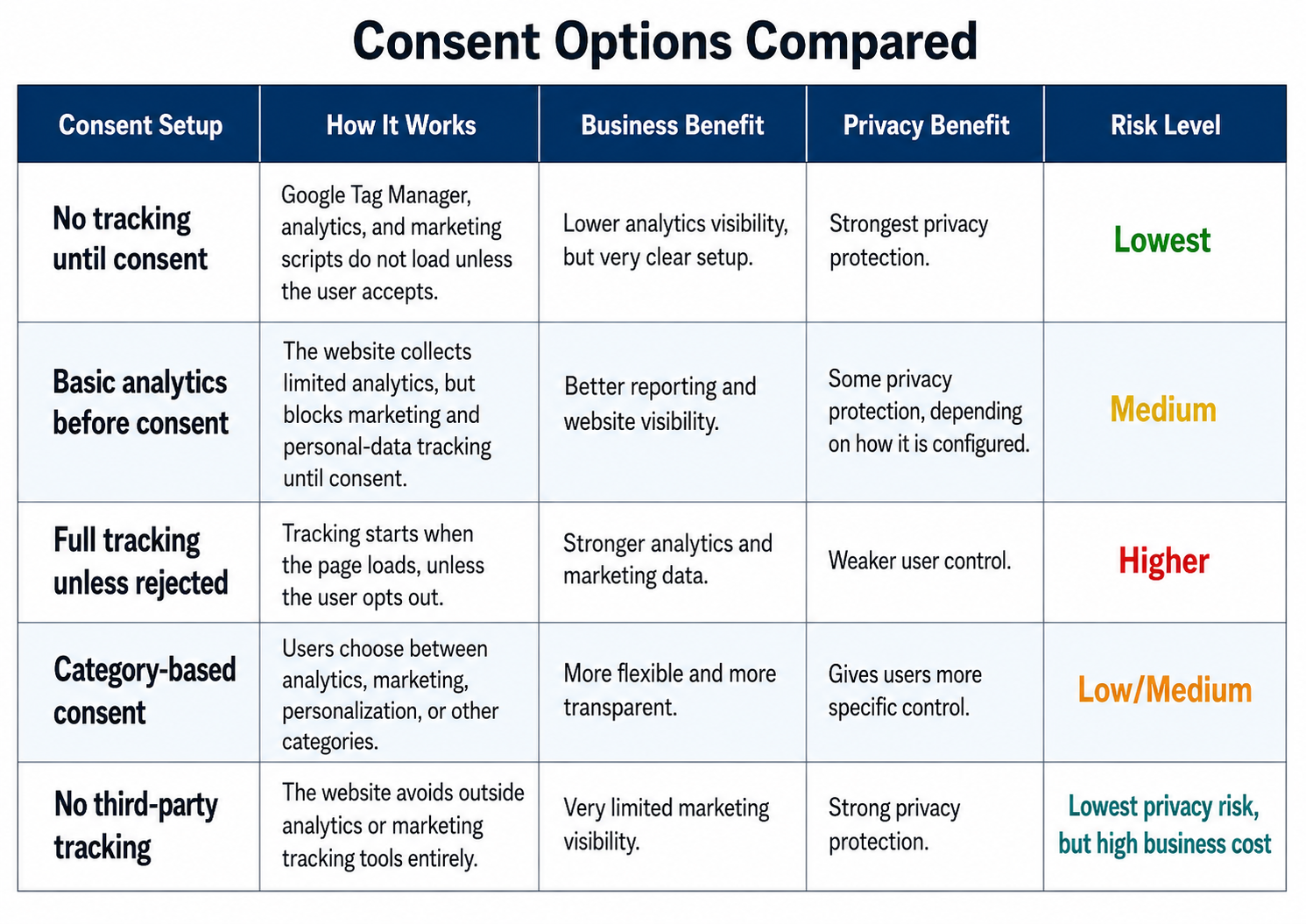
Here are the main options business owners usually face:

The cleanest privacy option is no tracking until consent. From a legal and technical standpoint, this is easier to explain. If the user has not accepted tracking, then the tracking tools do not load. There is less room for confusion because the website is not trying to separate “safe” data from “risky” data before the user has made a choice.

The downside is that the business loses visibility into users who do not consent. That can make analytics reports look incomplete. A business may still be getting visitors, but it may not be able to see those visitors in Google Analytics or advertising reports. For a business owner trying to make decisions, that can feel like flying blind.

The middle-ground option is basic analytics before consent, with marketing and personal-data tracking blocked until the user accepts. This is the option many businesses are drawn to because it feels practical. It allows the business to keep some reporting while still limiting higher-risk tracking. But this option depends heavily on the details. The business needs to know exactly what “basic analytics” includes, which tools are loading, whether cookies or identifiers are being used, and whether any purchase or behavior data is being sent to third parties.

The riskiest option is full tracking unless the user rejects it. This may give the business stronger marketing data, but it can create privacy and legal concerns, especially if users are being tracked before they have made a meaningful choice. Just because a setup is common does not mean it is safe.

Category-based consent may be the most balanced approach when it is done well. Instead of forcing users into one all-or-nothing choice, it allows them to accept or reject different types of tracking. For example, a user may allow necessary website functions but reject advertising or personalization. The challenge is that this setup requires more careful configuration. The banner must match what the website actually does, and the tags must respect those choices.

For some businesses, avoiding third-party tracking entirely may be the safest route. That may make sense for websites dealing with sensitive topics, vulnerable users, healthcare-related content, legal issues, financial concerns, or anything where the privacy risk is higher. But for most businesses, removing all analytics is a difficult tradeoff because it limits their ability to understand and improve the website.

The point is not that every business must choose the strictest option. The point is that every business should understand the tradeoff it is making. Consent is not just a banner design decision. It is a business decision, a technical decision, a marketing decision, and a privacy decision all at the same time.

A good consent setup should answer these questions clearly:
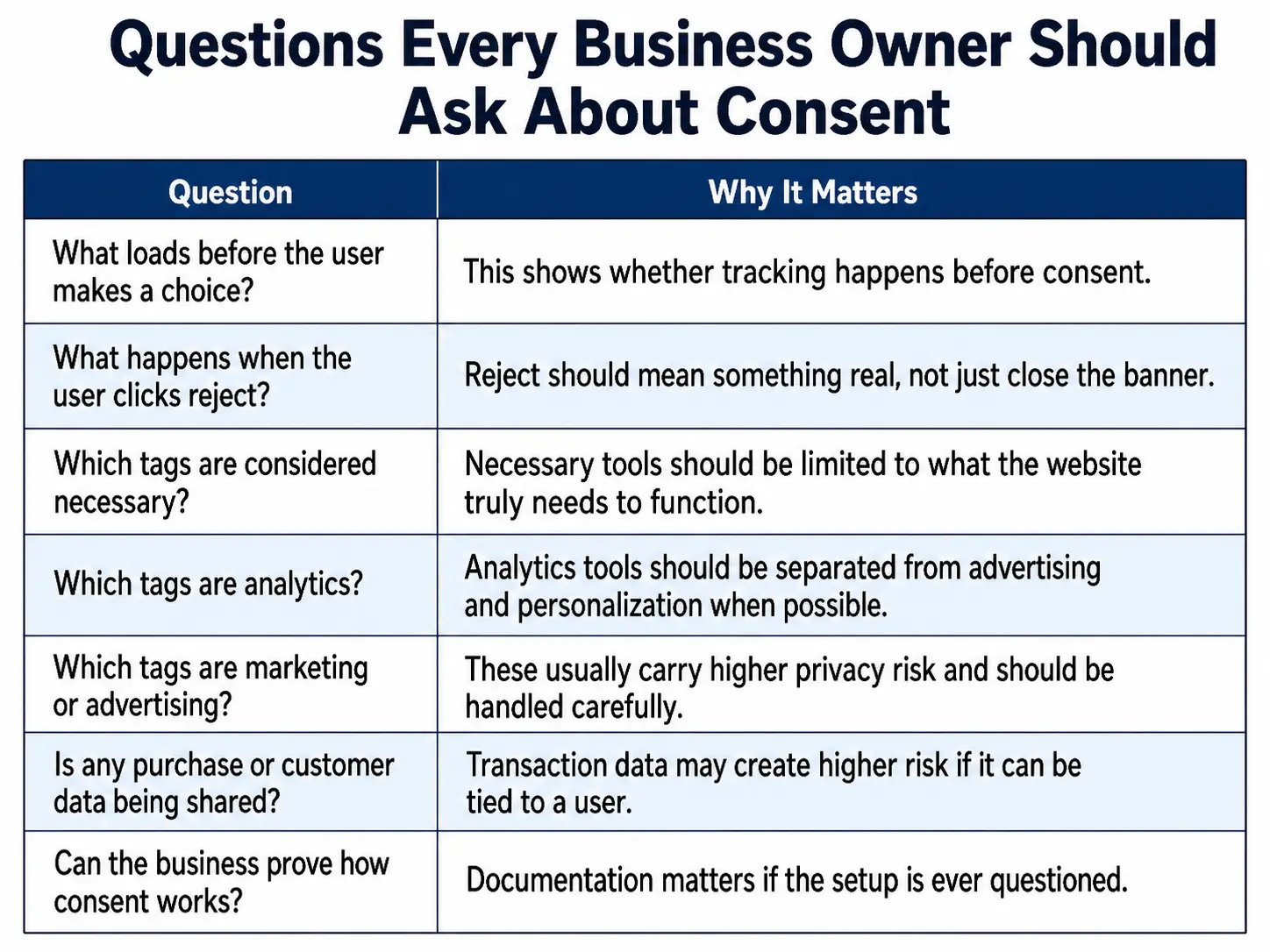
questions every business owner should ask about consent

The best consent choice is the one the business can honestly explain and defend. If a business owner cannot clearly say what is being collected, who receives it, when it starts, and what happens when someone rejects tracking, then the consent setup is not finished.

What Business Owners Should Ask Before Installing Tracking Tools

Before a business owner adds Google Analytics, Google Tag Manager, Facebook Pixel, Microsoft Ads, email tracking, abandoned cart tools, or any other marketing script to a website, they should slow down and ask what the tool is actually doing.

This is not because every tracking tool is bad. Many of these tools are useful and, in some cases, necessary for running a modern business website. The problem is that tracking tools are often added quickly because someone wants better reports, better ads, better retargeting, or better conversion data. But once the tool is installed, it may start collecting or sharing information before the business owner fully understands the privacy impact.

The first question should be simple: what is installed on the website? Many business owners do not actually know how many scripts, pixels, tags, plugins, and third-party tools are running in the background. A site may have Google Analytics, Google Tag Manager, Meta Pixel, Microsoft Ads, email marketing scripts, review widgets, heatmap tools, live chat, affiliate tracking, and abandoned cart tools all loading at different times. If the business does not have a clear inventory, it cannot make informed decisions about consent.

The next question is what each tool collects. This is where vague answers are not good enough. “It just tracks analytics” is not a complete explanation. The business needs to know whether the tool collects page views, clicks, product names, purchase amounts, email addresses, IP addresses, cookies, client IDs, ad click IDs, device information, or other identifiers. Some of those details may be lower risk, while others may create much bigger privacy concerns.

Business owners should also ask when each tool loads. This is one of the most important consent questions. Does the tool load immediately when the page opens? Does it wait until the user clicks accept? Does it still load if the user clicks reject? Does it load on checkout pages, account pages, form pages, or product pages? The timing matters because a banner does not protect anyone if tracking already happened before the user made a choice.

Another important question is whether the data is being shared with a third party. A business owner may feel comfortable collecting certain information for internal reporting, but the risk changes when that information is sent to Google, Meta, Microsoft, or another outside platform. Once data leaves the website, the business has less direct control over how it is processed, stored, combined, or used.

Business owners should also ask whether the tracking setup matches the privacy policy and cookie banner. This is a big one. If a privacy policy says certain tracking only happens after consent, then the website needs to actually work that way. If the cookie banner gives users a reject option, then rejecting should block the appropriate tags. The words on the website and the behavior of the website need to match.

Finally, the business should ask whether it can prove how consent works. This may sound overly cautious, but documentation matters. If a business is ever questioned, it should be able to explain what tools were installed, what data they collected, what fired before consent, what was blocked after rejection, and why the company believed its setup was reasonable.

A simple consent review does not have to be complicated, but it does need to be specific. A business owner should be able to answer these questions clearly:

questions business owners should ask before installing tracking tools

The biggest mistake is assuming that because a tool is popular, it must be safe. Google Analytics, Google Tag Manager, Facebook Pixel, and other marketing tools are common, but common does not automatically mean risk-free. Business owners still need to understand what they are using and why.

A better approach is to treat tracking like any other business decision. Know what you are installing. Know what it costs. Know what risk it creates. Know what value it provides. Then decide whether that tradeoff makes sense for your business and your customers.

Key Legal Privacy Resources

Final Thoughts

Website tracking is not as simple as turning analytics on or off. It sits in the middle of business needs, customer privacy, legal risk, marketing performance, and technical implementation. That is why this issue gets so messy so quickly.

Business owners need data to make smart decisions. They need to know whether their website is working, whether ads are performing, whether customers are getting stuck, and whether their marketing money is being spent wisely. That is a real business need, and it should not be dismissed.

At the same time, customers deserve to know when their behavior is being tracked, where their data is going, and whether outside platforms are receiving information about what they do on a website. A user should not have to be a developer or privacy lawyer to understand what happens when they visit a site.

The safest answer is usually the clearest one: do not collect or share nonessential tracking data until the user gives consent. But many businesses will still choose a middle-ground approach, especially if they believe they need basic analytics to operate responsibly. If they do, they should make that choice carefully. They should know what tools are installed, what data is being collected, which third parties receive it, what happens when a user rejects tracking, and whether the setup matches the privacy policy.

The biggest mistake a business owner can make is assuming that “basic analytics” automatically means “safe.” Sometimes it may be low risk. Sometimes it may not be. The difference depends on the data being collected, how it is connected to users, where it is sent, and whether the user had a meaningful choice.

My biggest takeaway is that website tracking should not be treated as a default setting. It should be treated as a business decision. Like any business decision, it needs to be understood, documented, reviewed, and weighed against the risk.

A good tracking setup does not just help the business collect data. It helps the business earn trust.

Disclaimer: Please keep in mind that we may receive a commission when you click on our links and make a purchase. This, however, has no bearing on our reviews and comparisons.

Subscribe to our newsletter for more website tips!

7 + 1 =

0 Comments

8 Steps To Website SEO

Free! 8 Steps To Website SEO

Join our mailing list to receive the latest news and updates from our team.

You have successfully subscibed! Soon you will receive an email with your free 8 steps to SEO.